
This guide is general information, not legal advice. Consult a lawyer for compliance questions specific to your business if needed.
A customer opens their inbox to a dozen emails they never asked for and presses the delete button several times in quick succession. They only trust brands that ask for permission to reach out through an opt-in email—an email that confirms or establishes a person’s decision to receive communications from a business. It can be a confirmation email sent after someone signs up or an email a customer sends to indicate they want to opt in.
When customers give permission upfront, they are less likely to delete messages and file spam complaints.
This guide covers what opt-in emails are, why they matter for deliverability and compliance, the difference between single and double opt-in, the elements of a strong opt-in email, and real examples of opt-in language you can adapt.
Opt-in email key takeaways
- An opt-in email confirms or establishes a person’s decision to receive communications, either through a confirmation message or a customer’s own opt-in response.
- Opt-in lists perform better because the people on them chose to be there, which improves deliverability and lowers spam complaints.
- Single opt-in confirms with one step; double opt-in adds a confirmation email, trading faster growth for stronger proof of consent.
- Requirements vary by law: GDPR requires consent before you send; CAN-SPAM in the U.S. doesn’t, but sets strict rules for every commercial email you do send.
What is an opt-in email?
An opt-in email is an email used to confirm or establish that someone has chosen to receive communications from your business. It can be a confirmation email sent by a business after a person submits their information or an email a customer sends to indicate they want to opt in.
Opt-in emails can support different types of communication, from email marketing to appointment reminders. The key is that the person’s decision to receive those communications is clear and intentional.
That clear expression of permission is what makes the opt-in process intentional rather than assumed, and it’s the foundation everything else in this guide builds on.
Customers can indicate consent when they check a box on a website form, send a text-to-join message, click a confirmation link, or reply to an email to indicate they want to subscribe. What matters is that the person takes a clear, active step rather than being contacted without asking.
Why opt-in emails matter for deliverability and compliance
Opt-in emails matter because permission-based lists perform better and carry less legal risk than lists built without it.
1. Deliverability
Recipients who consent via email opt-in messages are far less likely to mark a message as spam, because they asked for it. Fewer spam complaints mean inbox providers trust your sending domain more, which keeps future emails out of the spam folder in the first place.
That trust compounds over time. Inbox providers track sender reputation across every email you send, not just individual campaigns, so a list full of engaged, permission-based subscribers protects deliverability for everything you send afterward. A list built without real consent does the opposite: even a well-written email can land in spam if enough recipients on that list never wanted it in the first place.
2. Compliance
The legal requirements for your email list opt-ins depend on where your recipients are. In the U.S., the CAN-SPAM Act doesn’t actually require opt-in consent before you send a commercial email, but it does require accurate sender information, an honest subject line, clear ad disclosure, a physical postal address, and a working opt-out that you honor within 10 business days. Violations can carry civil penalties of more than $53,000 per email, so the rules are well worth following.
In the EU, GDPR works differently: it generally requires consent as the legal basis for sending marketing email, and that consent has to be freely given, specific, and unambiguous. A pre-checked box doesn’t count. This guide is general information, not legal advice, so talk to a lawyer about what applies to your specific business and audience.
The takeaway is that “opt-in” isn’t one universal rule; it’s a best practice everywhere and a legal requirement in specific places. Building your opt-in process to the stricter standard—real consent, clearly documented, and easy to withdraw—tends to satisfy both the deliverability goal and whichever compliance regime actually applies to your audience.
Types of email opt-in: single vs. double opt-in
The two main types of email opt-in are single opt-in, which requires one action to subscribe, and double opt-in, which adds a second confirmation step before the signup is final.
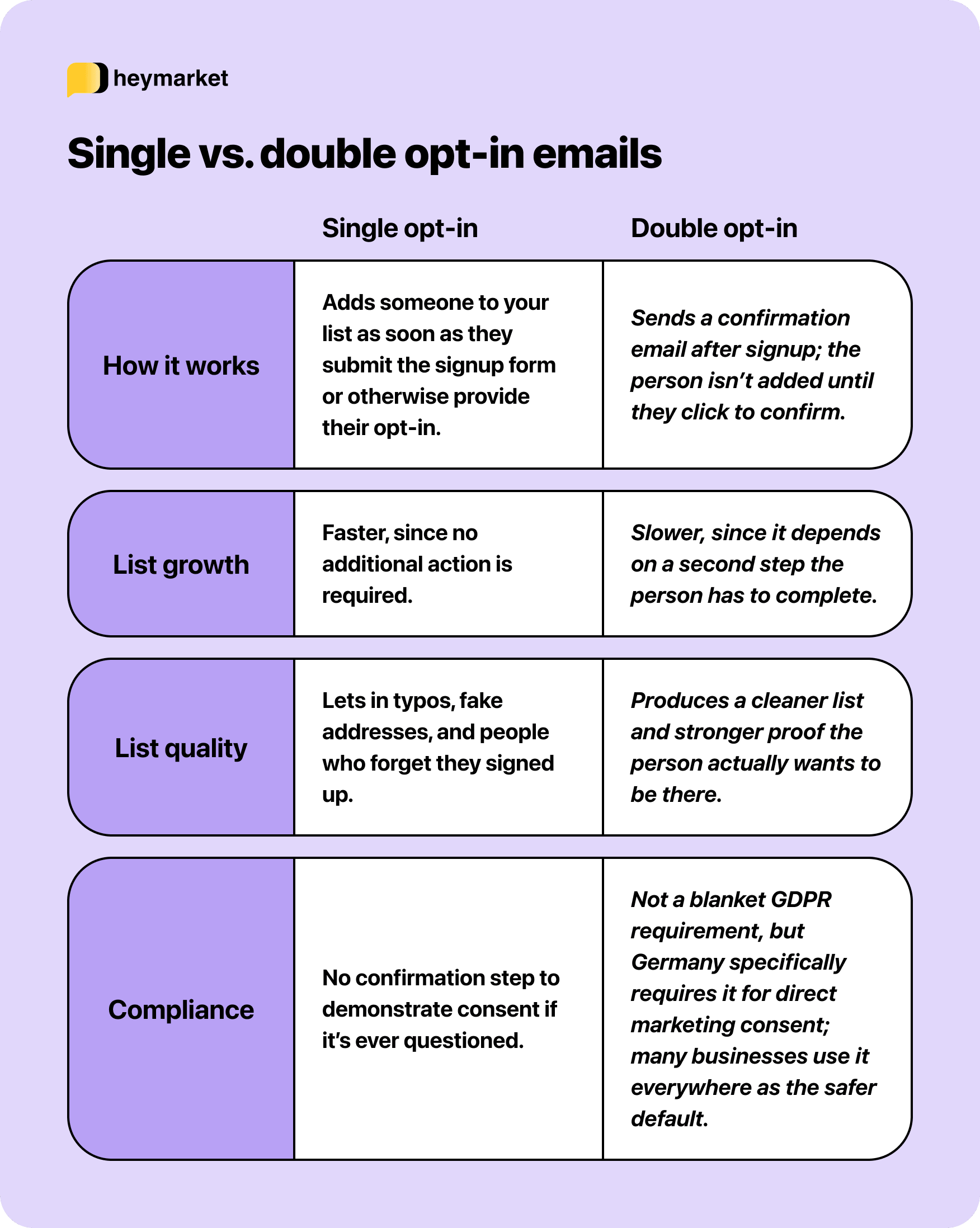
For most businesses, the choice between single opt-in vs. double opt-in comes down to how much you value list size versus list quality, and how much legal weight your email opt-in messages need to carry in the jurisdictions your audience is in.
Elements of an effective opt-in email (with examples)
An effective opt-in email clearly confirms what your customer is agreeing to receive and makes the next step obvious. The core elements to include in your email opt-in workflow are:
- A clear subject line: Say what the email is, without misleading the recipient about its contents. “Please confirm your subscription to [Company] updates” works for a confirmation request.
- What they’re opting in to: Email opt-in language should clearly state what the person is agreeing to receive, so there’s no confusion about why the email arrived. “You’re almost there. Click below to confirm you’d like to receive [type of content] from us.”
- How often they’ll hear from you: Set the expectation upfront, so future emails don’t feel like a surprise. “You’re confirmed. Here’s what to expect: [frequency] emails about [topic], and you can unsubscribe anytime.”
- A confirmation step, for double opt-in: A clear, single button or link to confirm, with no extra steps or information required beyond that click.
- A visible unsubscribe option: An easy, working way to opt out in every email you send afterward, not just the first one. “Didn’t mean to sign up, or want fewer emails? Unsubscribe here.”
- Sender identification: Make clear who the email is from, so the recipient recognizes it and trusts it.
Remember to always have clear email opt-in language so your customers know exactly what they’re signing up for, and what to expect. What trips businesses up is inconsistency: being clear about frequency at signup and then emailing more often than promised, or making the confirmation step easy but the unsubscribe link hard to find. Treat both ends of the relationship, joining and leaving, with the same clarity.
Automating your email opt-in and welcome flow
Once your opt-in workflow is set up, you can automate the confirmation and welcome messages that follow. These emails don’t need to go out one at a time. An automation can trigger the confirmation message when someone opts in, followed by a welcome sequence if they complete the required step.
Templates within that same automation help here too: build the confirmation and welcome messages once, and every new signup gets the same clear language, whether one person confirms or a thousand do. The confirmation and welcome messages are often the first communication your new subscriber gets from your business, and they set the tone for everything that follows.
From there, many businesses extend the welcome message into a full email drip campaign, so the relationship keeps building over the following days instead of ending after one message.
Build a list that wants to hear from you
A clean, permission-based list outperforms a bigger one built without real consent, in deliverability and in trust. Getting the opt-in process and language right from the start is what makes that possible.
See how Heymarket can automate your confirmation and welcome messages: book a demo.
Opt-in email FAQs
Teams setting up an email opt-in process tend to ask similar questions. Here are direct answers about opt-in language, confirmation emails, and the steps that establish consent.
What should opt-in language include?
Email opt-in language should clearly state what the recipient is agreeing to receive, how often they’ll hear from you, and how to unsubscribe. In a confirmation email, the message should also make the next step clear if another action is required to complete the opt-in.
Is double opt-in required by law?
Double opt-in isn’t required universally; GDPR doesn’t mandate it, though Germany specifically requires it for direct marketing consent. Many businesses use it everywhere anyway, since it produces stronger proof of consent regardless of jurisdiction.
Can you email someone without opt-in in the U.S.?
Yes, CAN-SPAM doesn’t require prior consent to send commercial email in the U.S., but every email still needs accurate sender info, an honest subject line, and a working opt-out. This is general information, not legal advice, so confirm your specific obligations with a lawyer.
How do you write a good unsubscribe line?
Keep it short, visible, and functional with no extra steps required to opt out. “Unsubscribe here” with a working link is enough; anything that adds friction defeats the purpose.