



Texting is one of the most popular ways we communicate today. Whether you’re a business providing customer service over SMS, coworker coordinating via Slack channels, or friend keeping in touch with a group chat, texting makes conversations effortless.
However, quick messages can also create confusion. Without facial expressions or the tone of someone’s voice, it’s hard to know whether “sure” means agreement or annoyance. Emojis and texting acronyms add another layer—a thumbs-up emoji or “lol” can signal anything from satisfaction to disengagement. Even subtle differences in punctuation can change a message’s meaning: “Thanks.” feels very different from “Thanks!” when you’re addressing a client’s complaint.
No matter who you’re texting or why, understanding what someone’s trying to say—and ensuring your message is equally clear—is essential for preventing miscommunication.
That’s where artificial intelligence comes in. Tools like ChatGPT can analyze text messages to identify tone, emotion, and intent, helping you better understand the meaning behind the texts you send and receive. That way, you can answer customers’ questions with confidence and respond thoughtfully to teammates or friends without worrying about sending mixed signals.
Keep reading to learn why AI is great at analyzing text messages and how to start using AI-powered texting tools to communicate more effectively.
Why should you analyze texts with AI?
Every text says a little more than what’s written on the screen. The words someone chooses, how quickly they reply, and even the punctuation they use can shape how a message is understood. Text analysis helps reveal those subtle cues, offering insight into both what’s being said and how it’s being received.
On a conversational level, analyzing texts helps you read between the lines. You can sense when a customer’s patience is fading or if they’d be a good candidate for a testimonial at the end of the sales cycle.
For example, if a customer who previously said “No problem! Thanks” when asked to wait a moment responds with “okay.” the second or third time, they might need more empathy from the customer service agent and priority assistance to avoid a negative review or lost opportunity.
On a broader scale, text analysis shows how communication works across businesses and organizations. It can uncover how customers typically respond, which topics come up most often, and how your team’s tone shifts across different types of conversations.
For example, analysis might reveal that a certain agent’s communication style receives better feedback than others, or that customers often express frustration around a specific policy or process. With that insight, you can refine the way your team communicates and how your business supports customers overall. That might mean updating FAQs to clarify confusing policies or adjusting the language in text templates to sound more natural and empathetic.
Ultimately, text analysis helps you understand both the emotions within individual messages and the patterns that shape them across your business. Those insights help create clearer, more productive conversations that improve customer experiences.
How does AI analyze texts?
AI analyzes text messages by recognizing how language reflects emotion and intent. Tools like ChatGPT use natural language processing (NLP), which teaches computers to recognize the patterns that shape tone and meaning. By learning from large collections of written text, these systems pick up on the cues we naturally use, like phrasing, punctuation, and word choice, to interpret what someone might be feeling or trying to say.
After learning those patterns, AI can uncover meaning within new messages by looking for context clues and emotional signals that describe how a conversation feels, not just what’s being discussed.
With this “understanding,” it can perform:
- Sentiment detection: Identifies whether a message (or conversation) sounds positive, neutral, or negative based on tone and phrasing.
- Theme extraction: Finds recurring topics, such as billing questions, feature requests, or order updates.
- Intent recognition: Determines when someone is asking for help, confirming a purchase, or expressing frustration.
- Summarization: Condenses message threads into short recaps that highlight the main points or outcomes.
Because SMS and instant messages are short and conversational, they work especially well for AI-powered analysis. Still, context matters; a quick “fine” might sound polite in one chat but frustrated in another, depending on what came before it. That’s why it’s important to give your AI model the full picture for its analysis.
How can you use AI to analyze your texts?
AI tools can help you interpret tone, emotion, and intent in text messages, but to get meaningful insights, you’ll need to approach each tool with the right setup. ChatGPT is great for analyzing message batches or exploring tone trends, while built-in AI features in business messaging platforms can provide quick, real-time feedback as conversations unfold.
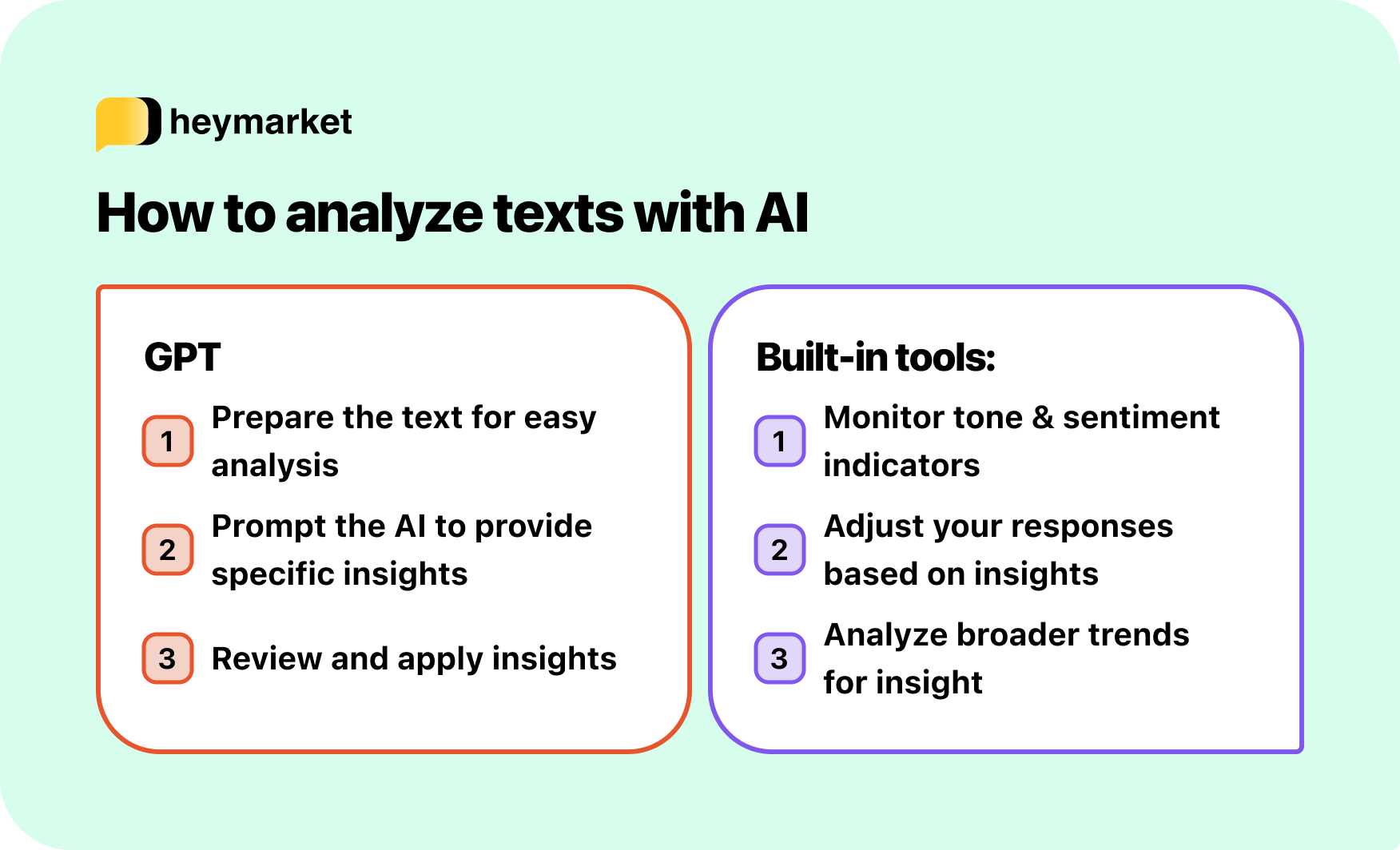
Steps for using ChatGPT to analyze texts
ChatGPT can analyze text messages when you share full conversation transcripts or short exchanges. Because it isn’t purpose-built for message analysis, you’ll need to paste in your texts manually and guide it with prompts each time. It’s great for summarizing threads or spotting recurring themes across conversations, but it’s not ideal for real-time sentiment tracking or automatic summaries.
Here’s how to make it work.
Step 1: Prepare your text
Start by cleaning up your messages. Remove anything unrelated, like timestamps, system messages, or signatures, so the AI can focus on the words that matter. For example, if you’re analyzing a support chat, include only the back-and-forth between the customer and agent to help ChatGPT better interpret tone and context.
Step 2: Add context and prompt the AI
Once your text is ready, paste it into ChatGPT and explain what you want to learn. For example:
“Analyze this conversation between a customer and a service agent. Describe how the customer’s tone changes throughout and summarize their main concern.”
ChatGPT can flag tone shifts, emotional cues, and recurring themes. If you want broader insights, you could provide multiple conversation logs and prompt it with:
“Analyze these conversations together. Identify common themes, tone patterns, and what factors seem to affect customer sentiment.”
With this kind of input and prompt, ChatGPT can highlight trends that emerge across multiple chats, like phrases that consistently earn positive reactions or tone differences between sales and support interactions, to help teams refine their overall communication style and better understand what customers expect from them.
Step 3: Review and apply the insights
ChatGPT’s analysis can reveal tone patterns, interpret customer sentiment, and highlight moments that may need clearer communication. But because AI doesn’t experience emotion, its interpretations aren’t perfect. Double-check its findings using real examples and rely on your understanding of your audience to decide what makes sense.
Steps for using built-in analysis tools
Some messaging platforms include AI sentiment indicators and summaries that provide instant feedback during active conversations, helping teams read tone in real time and adjust on the spot.
These tools usually require less setup and come as part of a larger suite of AI productivity tools, like suggested replies or real-time translation, making them especially helpful for customer service and sales teams who handle frequent and diverse conversations.
Here’s how to use AI-assisted messaging tools.
Step 1: View tone indicators as you chat
As messages arrive, built-in AI tools may display visual cues, like emojis or tags, that show how the conversation feels overall. These quick snapshots make it easy to gauge tone without having to analyze every message manually, especially when handing over a chat to another team member.
Step 2: Adjust responses in the moment
If the sentiment indicator shifts toward neutral or negative, it’s a signal that your team member may need to write with more empathy or clarification. This real-time feedback helps keep conversations positive and resolve tension before it creates a poor customer experience.
Step 3: Review summaries or sentiment trends
Some tools offer brief summaries or sentiment reports that show how recent chats have gone. For deeper insight, you can group conversations by satisfaction level and analyze them with ChatGPT to identify what makes great interactions successful, and what struggling ones might be missing.
Making conversations clearer with AI
AI is changing how we understand everyday communication. From tools like ChatGPT that identify tone patterns and recurring themes to built-in sentiment indicators that uncover emotion in real time, it’s easier than ever to connect what’s said and what’s meant.
By using AI to analyze your texts, you can better anticipate customer needs, spot tone shifts early, and create more thoughtful, consistent responses. Together, these insights help every message feel a little more personal, and every conversation a little more human.
Try Heymarket’s AI-powered messaging today to see how real-time sentiment indicators and summaries can improve your team’s conversations.

