

Texting is the fastest, most convenient way for customers to reach a business. But the more people text, the harder it gets for teams to keep up—especially when 71% of customers expect a personalized response every time.
An AI SMS chatbot is a text-messaging tool that uses artificial intelligence to read incoming messages and automatically generate relevant, conversational replies over SMS. It interprets what each customer is asking and responds in context using the information it’s been trained on, rather than a fixed set of canned replies.
Businesses use SMS AI chatbots to answer common questions, book appointments, and handle routine requests around the clock, freeing agents to focus on the conversations that need a human.
But before you start with your own AI SMS chatbot, it’s important to know the different types that are available, how to use them, and ways to get the most out of your SMS chatbot using AI.
Key takeaways
- An AI SMS chatbot uses AI to read and answer texts automatically, interpreting intent and replying in context instead of following a script.
- There are two ways to get one: use an out-of-the-box AI agent from a texting platform, or assemble your own from a texting service, an AI model, and an automation tool.
- They’re best suited to FAQs, appointment scheduling, lead qualification, and after-hours coverage across SMS and other channels.
- Accuracy depends on the content you train the chatbot on and whether you keep a human in the loop for sensitive or high-stakes conversations.
What is an SMS chatbot?
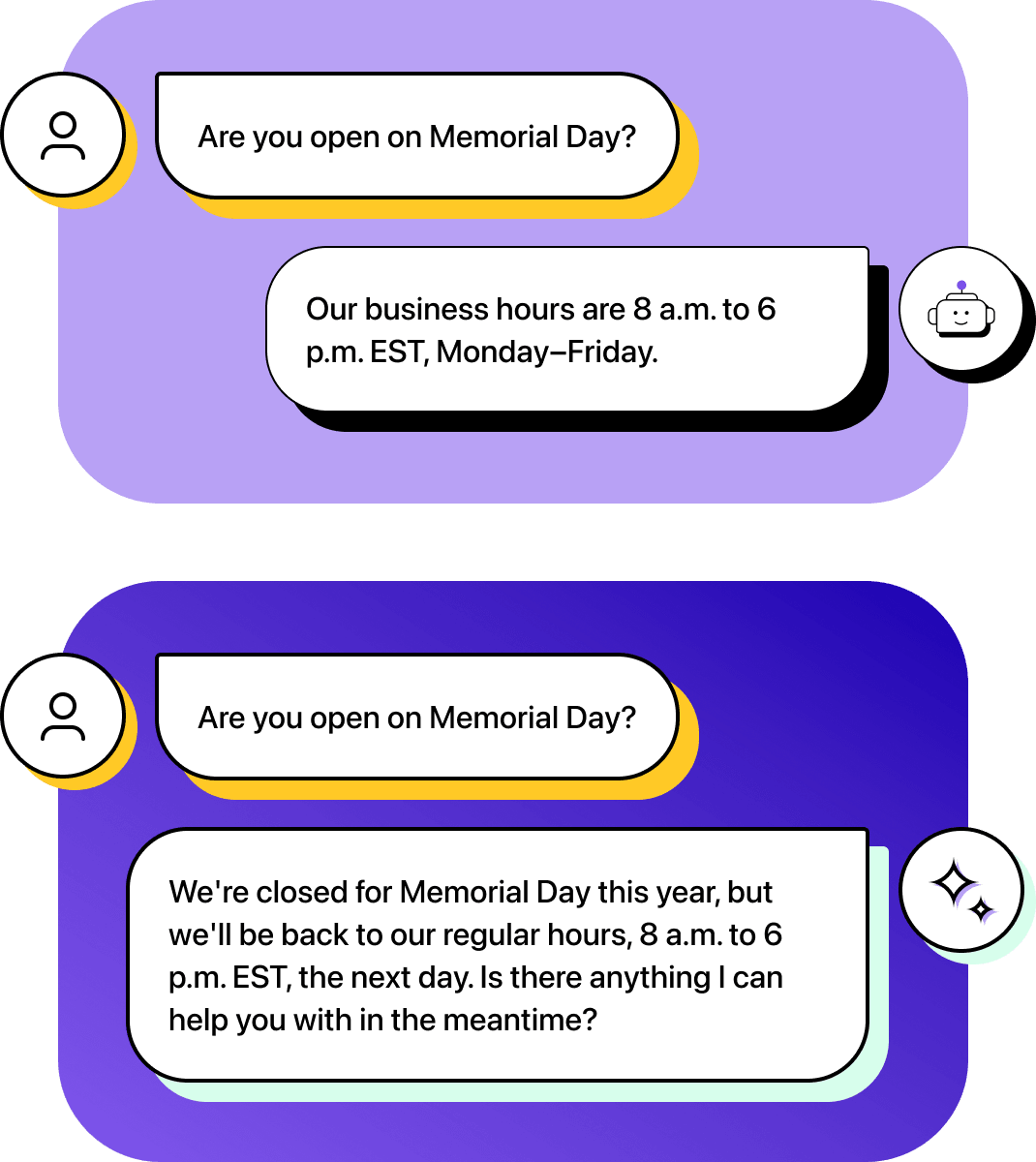
SMS chatbots are tools you program to reply to incoming text messages, often through sales or customer service channels. They trigger a text template that you’ve built to answer a question or provide more information, which also usually includes custom fields and merge tokens that let you tailor them to the recipient.
For example, you can program the SMS chatbot to reply to any message containing “business hours” with your hours of operation. Or you can give customers a set of numbered choices, each representing a department like billing or appointments, so when a customer replies with the corresponding number, the chatbot sends back that department’s phone extension.
But there’s no problem-solving ability with standard SMS chatbots. If something doesn’t match a trigger you’ve created, it defaults back to a human agent.
What is an AI SMS chatbot?
An AI SMS chatbot dynamically interprets an incoming message and generates a response based on its context, rather than matching it to a template you wrote in advance.
Depending on your training data and instructions, its AI-generated responses can range from a quick, direct answer to a detailed reply with the specifics a customer needs.
For example, you can train an AI SMS chatbot on your knowledge base to answer questions about policies or FAQs automatically, even outside business hours. When a customer asks about something specific, such as your return policy, it can find the relevant details in your knowledge base and deliver them in a complete reply.
Depending on your settings, it can send these replies automatically or hand them over to an agent for final approval. Many AI chatbot tools can also learn your brand voice, so those replies stay personalized and sound like your team wrote them every time.
Benefits of AI SMS chatbots
Once an AI SMS chatbot is running, it increases the amount of work a small team can handle. Instead of every message waiting on a free agent, routine questions get handled the moment they arrive, no matter when they’re received or how many messages come through.
That means:
- Faster response times: Customers expect a reply to a text in under a minute. If you take longer, they’ll go elsewhere. An AI SMS chatbot replies immediately, providing a complete answer in a fraction of the time it takes a human to greet them.
- Room to scale: Personalized service is hard to keep up when customers outnumber agents. Because the chatbot fields routine questions on its own, your team can handle fewer repetitive threads and spend its time on more complex issues where human judgment matters more.
- Consistent coverage: The hundredth customer of the day gets the same accurate, on-brand answer as the first, whether they reach you over SMS or another channel in your inbox. Answers come from one trusted resource rather than each agent’s memory, so replies hold consistent no matter who would have fielded them.
When used properly, an AI SMS chatbot absorbs the routine volume that used to slow everyone down, so response quality stops depending on how busy the day is.
How AI SMS chatbots work
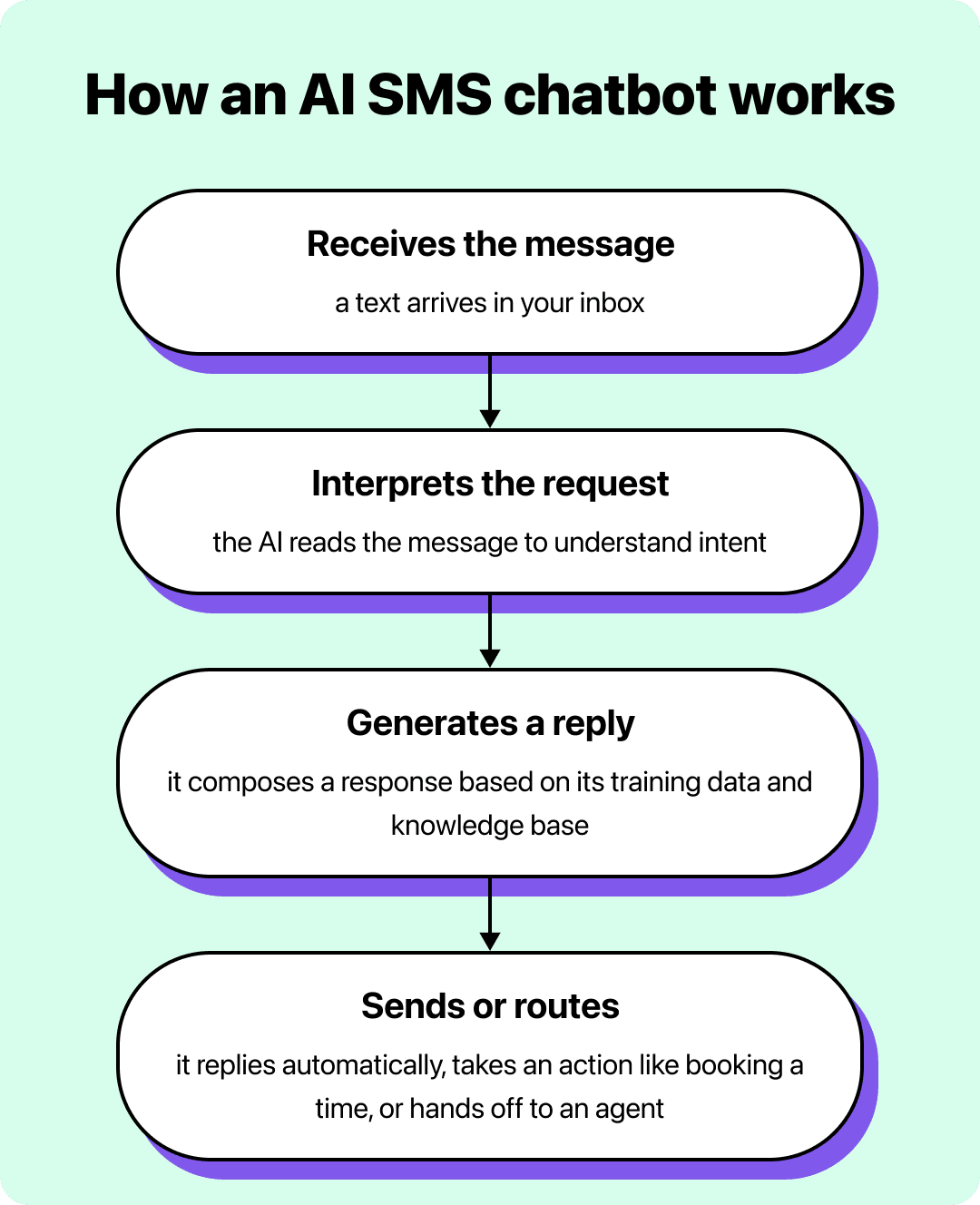
Everything an AI SMS chatbot does happens in the few seconds between a customer hitting send and a reply arriving on their phone. Behind that quick turnaround is the same four-step sequence, running every time a message comes in.
The AI SMS chatbot:
- Receives the incoming text through your messaging channel
- Figures out the customer is actually asking
- Generates a reply informed by its understanding of the content you’ve trained it on
- Sends that reply automatically, or routes the conversation to an agent when it needs a human
- Takes an action when the conversation calls for it, like booking a time or updating a record
The loop stays the same from one chatbot to the next. What changes is how you put it in place.
AI SMS chatbots mostly fall into two categories: prebuilt tools that work out of the box or a setup you assemble yourself. The right one for your team depends on your resources and how much control you want.
Out-of-the-box chatbots
If you want to start quickly, or you’d rather not commit technical resources to building your own system, a self-contained AI SMS chatbot works out of the box. These tools let you train the chatbot on your business information and answer customer messages dynamically, and they can run without supervision outside office hours.
Build your own chatbots
If you want more control, or a highly customized setup on a budget, you can combine a few tools to configure a bot yourself. You’ll need a:
- Business texting service
- AI model
- Tool to pass messages between them automatically
From there you can add integrations to build more complex flows, as long as you can get them working together.
Out-of-the-box options are generally code-free, while building your own usually takes some coding and technical knowledge to connect different app APIs. Fortunately, you can usually use AI to help you create the code you need to make all your apps communicate.
SMS AI chatbot use cases
Texting is fast and accessible, so it’s the perfect form of communication for all types of customer communications. AI SMS chatbots’ improved efficiency can help you communicate more effectively, reducing the resource investment required to build positive relationships with customers and other contacts in various departments.
Sales
Leads evaluate your business by how quickly and clearly you answer them, so a slow reply can cost a sale before a rep is even involved.
An SMS AI chatbot can answer common questions about products, pricing, and policies instantly using the information you’ve trained it on, keeping a prospect engaged in the moment they’re interested.
When a conversation shows real buying intent, it can move things forward by offering to book time with a rep, and hand off anything it can’t answer so the lead still gets a fast, accurate response.
Customer service
Customers want your agents to acknowledge their problems and then solve them as quickly as possible. If you take a long time to reply to a text inquiry or provide generic responses that aren’t personalized, it can hurt customer satisfaction and impact their trust.
An AI SMS chatbot answers frequent questions the moment they come in by drawing on your knowledge base, resolving routine issues without an agent and shortening the queue for everyone else.
For anything that needs judgment, like a sensitive account or a complaint, it routes the conversation to a person with the full thread attached, so nothing gets dropped in the handoff.
Recruiting
Recruiting requires a lot of information collection to help qualify your potential candidates. Filtering through hundreds of resumes can take hours, and some may not even pass basic screening requirements, leading to wasted time and resources.
An AI chatbot can ask consistent screening questions and answer the ones candidates always have, covering details like hours, pay range, benefits, and start dates without pulling in a recruiter. That keeps outreach moving during hiring surges and points candidates toward next steps while your team focuses on the people worth a closer look.
How to create an AI SMS chatbot
If you want to have more control over how you can use your AI SMS chatbot, it makes sense to build your own chatbot. You can use a combination of different apps and providers to create a DIY configuration that triggers texts automatically, reads and responds to incoming messages, and sends these generated texts to your contacts.
Here’s how you can start with an AI text chatbot. But if you find yourself looking for a business texting platform, note that many of them offer built-in AI text messaging tools with better training and personalization that involve human agents throughout the communication process.
Choose a texting provider, automation tool, and AI model
You need the right tools to build an AI SMS chatbot. You’ll need a way to receive and send texts, a tool for passing messages to the AI to read and reply to, and an AI model you can train on your business information to give accurate responses.
Heymarket, Zapier, and ChatGPT are all great options for creating your own chatbot because they work well together. Heymarket integrates with Zapier, which integrates with ChatGPT, making it easier for them to communicate and pass messages between your inbox and the AI bot.
Connect your texting and AI apps using automation
If you want to respond to messages from your customers automatically, you need to be able to read them, draft a reply, and send it back via the same SMS channel.
You can create a Zapier automation that looks for certain keywords in incoming texts through Heymarket’s inbox. If it finds one, you’ll trigger your next Zapier automation to update the contact record in Heymarket to log the conversation and then pass the message to ChatGPT so it can read and reply to it.
Once ChatGPT writes the text, another automation will pass the message back to Heymarket, where it will be sent using the texting API.
Teach your AI model how to respond to questions with training
One of the primary benefits of using an AI chatbot is its ability to develop an understanding of your business and create unique answers that reflect how well it understands your procedure, policy, and products. However, you need to equip it with this information if you want your chatbot to be accurate.
AI models learn by training, which involves writing scripts and prompts that the chatbot should reference to guide its communication style and the type of information it provides. When you enter these prompts into a model like ChatGPT, it will learn and remember the information so it can tailor the replies it generates.
Start by outlining the user intent that the bot will be helping with. Tell it whether it’s for customer service, sales, recruiting, or any other niche department so it has context for creating its replies. You should also outline your brand voice, desired tone, message lengths, terminology, and anything else that will make the AI SMS chatbot better represent your business.
Your chatbot also needs to know about your business, so it’s best to prompt the model with your FAQs, knowledge base, business information, products, and any branding details. Past conversations can also help to provide references for how it should communicate in different scenarios based on how human agents have responded.
Test your AI texting chatbot and add instructions as needed
After its initial setup, your chatbot will continue to learn with each message it receives. You can train it by starting conversations manually, evaluating its responses, and adjusting the prompt your chatbot uses to create replies. For example, if your AI SMS chatbot is too formal, you can tell it to use a business-casual tone in its replies. Or, if it’s getting too wordy, you can set a character limit to provide more concise answers.
You should also review and evaluate any conversations it can’t handle effectively on its own to see if there is anything your chatbot needs more information or guidance on. Business texting solutions like Heymarket will store conversations, which makes it easy to double-check that your SMS chatbot is a good representative of your business. If it’s not, you can refine its replies by changing the primary prompt or script it references.
Best practices for using AI SMS chatbots
AI is a tool, and just like all tools, the way you use it decides how effective it will be. If you use it correctly, you’ll improve your communication speed and consistency. If you use it incorrectly, you can hurt your customer relationships and lose trust.
While enterprise AI-assisted texting tools have built-in rules to create the most relevant messages, all AI tools can only reference information you provide, so your information quality will determine how accurate your answers are.
AI chatbots can make mistakes, especially if you don’t tell them how to handle questions they don’t have an answer to. In supervised setups, live agents can review chatbot responses and correct them before they go out. You should also include instructions telling the AI not to make up answers, especially in autonomous mode, so when it doesn’t know, it says so and directs the customer to a live agent.
It’s also important to constantly evaluate and iterate upon your AI text chatbot as you learn more about where it excels and struggles. You can add more business or product information to give more helpful responses, train it with chat logs from conversations the chatbot couldn’t handle on its own, and adjust the tone it uses based on customer feedback to make conversations more humanlike and engaging.
Build better customer relationships with AI SMS chatbots
Customers expect prompt, comprehensive, and personalized communication. Whether it’s for sales, customer service, or recruiting, an AI SMS chatbot helps you meet that expectation without stretching your team thinner.
AI texting chatbots let you answer routine questions around the clock without adding agents, and they free the agents you have to focus on the conversations that need human judgment. You can build your own configuration to fit specific needs, or start faster with a platform that includes AI agents ready to answer questions and book appointments out of the box.
Heymarket’s AI agents work inside your shared inbox, drawing on your approved knowledge base to answer accurately across SMS, email, and your other channels. You decide how much they handle on their own: let them reply automatically, or keep them in supervised mode so a teammate reviews each message before it goes out. Either way, your team spends less time on repetitive replies and more on the customers who need them.
Frequently asked questions
What are AI chatbots mainly used for?
AI chatbots mainly handle high-volume, repetitive conversations that don’t require a person: answering common questions, resolving routine support issues, qualifying leads, and pointing customers toward next steps.
In a business texting context, an AI SMS chatbot takes on the FAQs and routine requests that would otherwise tie up agents, so your team can focus on the conversations that need judgment.
How can AI be used in SMS?
AI reads incoming texts, works out what the customer is asking, and generates a relevant reply using the information it’s been trained on.
Beyond answering questions, an SMS AI chatbot can handle after-hours coverage, keep replies consistent across a busy team, and route a conversation to a live agent when it needs a human. Some AI texting tools can also take actions from the thread, like booking an appointment once they detect scheduling intent.
How much does a chatbot AI cost?
It depends on how you build it. A do-it-yourself setup has costs spread across the separate tools it relies on, usually a business texting service, an AI model, and an automation tool, each with its own pricing.
A platform that includes AI agents rolls those capabilities into one subscription, which is more predictable but priced by the provider’s plans. Either way, the main cost driver is your message volume and how much of the work you want automated.
For an accurate figure, check current pricing with the specific tools or platform you’re considering.
What are the limitations of AI SMS chatbots?
An AI SMS chatbot is only as accurate as the information you train it on, so gaps or outdated content in your knowledge base lead to weaker answers. It can also misread an unusual request or struggle with a sensitive conversation that really needs a person’s judgment.
You can manage these limits by keeping your training content current, instructing the chatbot to hand off rather than guess when it’s unsure, and using supervised mode so an agent can review replies before they go out for higher-stakes conversations.