


Modern teams don’t operate in a single system and software systems are event machines. As such, modern teams need to juggle data from different platforms. Example: a POS system handles orders, an ERP tool tracks shipments, and a CRM manages leads.
Each of these systems is constantly broadcasting “events”: an order is placed, a delivery is delayed, or a VIP customer hits a new milestone. Over the years, the protocols we use have been developed to enable these systems to communicate with one another. These protocols are the backbone of the modern internet, and webhooks are a key part of them.
Until now, Heymarket was broadcasting events to other systems (sending data out) when events happened in Heymarket (message received, message sent, etc.), but it didn’t have a mechanism to”listen” (bringing data in). That changes today. We’re excited to introduce Automation Webhooks, allowing any external system to trigger Heymarket automations directly.
Empowering every builder
Historically, webhooks and APIs were the territory of IT teams and developers. But the democratization of tooling is enabling a larger generation of builders. Today, Product Managers, Operations Leads, and Savvy Marketers are the new “builders.” You know your business logic best, and you should have the tools to automate it.
When we built Webhook Automations, we focused on three things:
- Simplicity: You shouldn’t need a computer science degree to connect your tools.
- Reliability: Data should move between systems without getting lost or “scrambled.”
- Control: While we’ve made it easier to build, we’ve kept the enterprise-grade security and permissions you expect.
The problem
Before today, if you wanted an event in your warehouse to trigger a text message in Heymarket, you usually had three imperfect choices:
- The “Waiting” Game (Polling): Constantly asking your system “Is there an update yet?” This is slow and inefficient.
- The “Custom Build”: Hiring a developer to build a bridge (middleware) between systems. It’s expensive and hard to maintain.
- The “Third Party”: Using tools like Zapier. While helpful, they add extra costs and another point where things can break.
The solution was simple: If your system says something happened, Heymarket should hear it and act on it immediately. No middlemen required.
How it works: A new “brain” for your workflows
We didn’t just add a “plug” to Heymarket; we embedded webhooks directly into our Automation Engine.
Think of the webhook as the doorbell. Once it rings, the “brain” of Heymarket Automations takes over. This means a single event from your external system can trigger a massive chain reaction:
- Send an SMS, MMS, or Email.
- Update a customer’s contact info or add them to a list.
- Assign the conversation to a specific teammate.
- Tag a chat or even close it automatically.
- Use Logic: If the “Order Value” is over $500, send it to the VIP team; otherwise, send a standard confirmation.
Use cases
- Custom order confirmations: Your e-commerce platform doesn’t have a native integration? No problem. When a customer buys something, your system sends a webhook, and Heymarket instantly texts them a receipt.
- Proactive shipping alerts: If your delivery partner marks a package as “Delayed,” Heymarket can automatically text the customer to apologize before they even have a chance to call you.
- Appointment reminders: When someone books a slot on your scheduling site, Heymarket can kick off a multi-channel reminder sequence (SMS + Email) to make sure they show up.
The technical details (made simple)
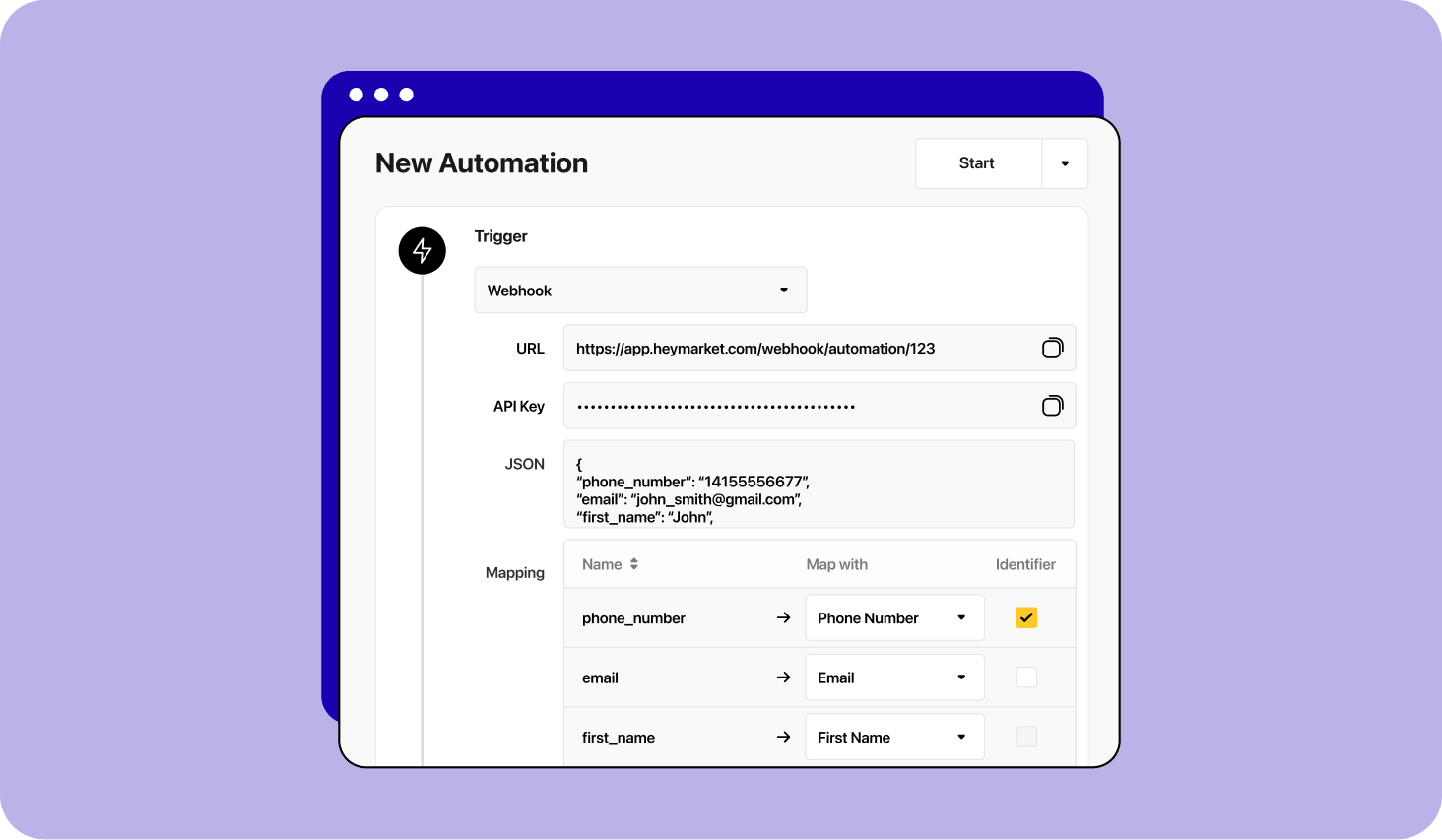
Setting this up is a breeze. When you create a new automation, you simply select “Webhook received” as your trigger.
- Unique endpoints: Every automation gets its own unique URL. This keeps your data organized and secure.
- Secure handshakes: We use a “Secret Header” (X-Webhook-Secret) to make sure only authorized systems can trigger your workflows.
- Smart mapping: You give us a sample of your data (JSON), and you tell us which parts matter (like “Phone Number” or “First Name”). If a piece of required data is missing, the system won’t run, preventing “broken” messages from being sent.
Ready to build?
By bringing Inbound Webhooks directly into Heymarket, we’ve removed the friction between your tools. Your communication logic is now centralized, scalable, and—most importantly—under your control.

